Mastering the Grunge Circle: A Practical Guide for Digital Creators
In the world of digital design, texture is often the difference between a flat, forgettable graphic and a piece that commands attention. The Grunge Circle has emerged as a versatile staple for designers looking to add depth, character, and an organic feel to their work. Whether you are crafting logos for a coffee shop, designing merchandise for a band, or creating social media assets for a lifestyle brand, this specific design element offers a rugged aesthetic that resonates with modern audiences. However, simply downloading a file is not enough. To truly leverage these assets, you must understand the technical nuances, licensing boundaries, and best practices that separate amateur outputs from professional-grade results.
Understanding the Value of Transparent Backgrounds
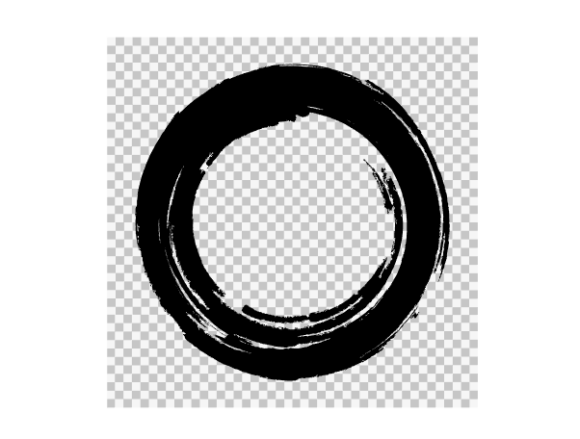
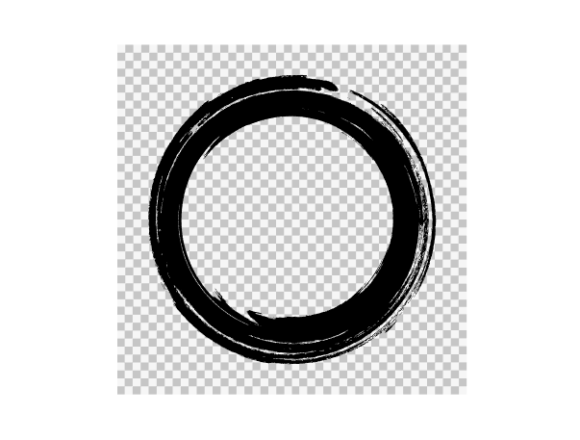
One of the most critical features of a high-quality grunge circle on a transparent background is its immediate usability. Many beginners overlook the importance of transparency, opting instead for files with white or solid-colored backgrounds. This mistake creates significant extra work later in the design process. When you use a grunge circle with a transparent background, typically indicated by a checkerboard of gray and white squares in preview images, you can layer the texture over any color, photograph, or pattern without needing complex masking tools.
If you ignore this detail, you may find yourself spending hours trying to remove unwanted white halos around your design elements. This not only reduces efficiency but can also degrade the quality of the final image, leaving jagged edges or pixelated artifacts. Always verify that your download includes PNG files with true transparency. This ensures that the distressed edges of the circle blend seamlessly into your project, whether it is a dark t-shirt print or a light-colored business card.
Navigating File Formats for Maximum Compatibility
A common misunderstanding among new creators is assuming that one file format fits all purposes. When you purchase a comprehensive digital pack, you will typically receive a ZIP folder containing SVG, PNG, JPG, EPS, and AI files. Using the wrong format for your specific application can lead to frustrating quality issues.
- Vector Files (SVG, EPS, AI): These are essential for scalability. If you are designing a large banner or a logo that needs to be resized frequently, vector formats ensure the edges remain crisp at any dimension. They are also required for professional printing processes like screen printing or vinyl cutting.
- Raster Files (PNG, JPG): These are ideal for web use, digital mockups, and quick edits in software that does not support vectors. However, remember that JPGs do not support transparency. Using a JPG version of a grunge circle on a colored background will result in an unsightly white box around your design.
Failing to distinguish between these formats can affect your production cost and time. For instance, sending a low-resolution JPG to a printer instead of a vector EPS file may result in a blurry, unprofessional product that requires reprinting. Always check the resolution of your raster files; the illustrations provided in premium packs are usually much higher quality than preview images, but you must ensure you are exporting them correctly for your intended medium.
Licensing and Ethical Usage Guidelines
While the convenience of an INSTANT DOWNLOAD is appealing, it is crucial to read and understand the shopping policies attached to digital assets. Most creators, including those offering grunge circles, allow for both personal and commercial use. This means you can use these designs on shirts, mugs, signs, and other decor items that you sell. However, there are strict boundaries that protect the intellectual property of the original artist.
You may not re-sell the digital design as if it were your own creation. This means you cannot upload the raw SVG or PNG files to another stock website or marketplace. Additionally, you cannot distribute the files for free or as part of a template pack unless explicitly permitted. Another frequent error is recreating a new design using these elements and claiming the entire composition as solely your own original artwork without acknowledging the source assets, especially if the grunge circle is the dominant feature.
Respecting these policies ensures a sustainable ecosystem for digital artists. It allows them to continue creating high-quality resources while giving you the freedom to build profitable products. Think of the license as a toolset rental: you can build whatever you want with the tools, but you cannot sell the tools themselves.
Avoiding Common Design Pitfalls
Even with the right files and proper licensing, poor application can ruin a project. A frequent mistake is overusing the grunge effect. Because the texture is visually striking, there is a temptation to apply it to every element on the page. This leads to visual clutter and makes the design difficult to read. Instead, use the grunge circle as a focal point or a subtle background accent to frame text or key imagery.
Another oversight is ignoring color contrast. Grunge textures often have irregular opacity levels. If you place a light-colored grunge circle over a light background, the details may disappear. Always test your design against various backgrounds to ensure visibility. For example, if you are making a sign, consider how the texture will look from a distance. High-contrast combinations, such as a dark grunge circle on a light wall, tend to perform better in real-world applications.
Maximizing Your Instant Download Experience
When you complete your purchase, the files are available immediately via your purchases page. This instant access allows you to start working right away, but take a moment to organize your files before diving in. Create a dedicated folder for your project assets and extract the ZIP file carefully. Review the included formats to ensure you have everything you need for your specific software.
Remember that the preview images you see online are often compressed for web speed. The actual files you download will be of much higher quality, offering sharper details and cleaner lines. This higher fidelity is crucial for professional printing. Do not judge the potential of the asset based solely on the thumbnail; trust the technical specifications provided in the product description.
By approaching the Grunge Circle with a clear understanding of file types, licensing rules, and design principles, you can elevate your creative projects. Whether you are a seasoned professional or a hobbyist just starting out, these digital elements provide a robust foundation for creating unique, eye-catching designs. Avoid the common traps of improper formatting and misuse, and you will find that these assets become indispensable tools in your creative toolkit.
Thank you for visiting our shop and investing in quality design resources. We hope these insights help you create something extraordinary.