Floral Branch Silhouette Vector Bundle: A Practical Guide to Elegant Design
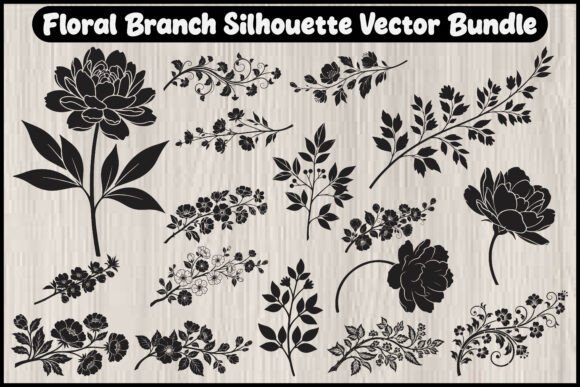
Integrating botanical elements into your creative workflow can instantly elevate the perceived value of your work. Whether you are designing wedding invitations, crafting custom home decor, or building a brand identity, the Floral Branch Silhouette Vector Bundle offers a streamlined solution for achieving that timeless, organic aesthetic. However, many creators rush into using these assets without fully understanding the technical nuances of vector files, leading to frustrating results during production. This guide aims to help you navigate the common pitfalls associated with digital floral assets, ensuring you maximize both quality and efficiency in your projects.
Understanding the Value of True Vector Formats
One of the most frequent misunderstandings among beginners is the difference between raster images (like JPGs or PNGs) and vector graphics. When you download a bundle like this, which includes AI, EPS, SVG, PDF, JPG, and PNG files, it is crucial to know which format serves which purpose. Many users mistakenly rely on the included JPG or PNG files for large-scale printing or laser cutting. While these formats are convenient for quick web previews or social media posts, they are pixel-based. This means that if you resize them beyond their original dimensions, they become blurry and pixelated.
In contrast, the AI, EPS, and SVG files contained in this bundle are mathematically defined paths. They allow you to scale a delicate flower branch from the size of a business card to the dimensions of a wall mural without losing a single detail. For professionals using tools like Adobe Illustrator or CorelDRAW, the AI and EPS files provide editable nodes, letting you customize the curvature of stems or the density of leaves. Ignoring these vector formats limits your versatility and can result in poor-quality outputs that reflect badly on your brand.
Common Mistakes in Laser Cutting and CNC Projects
If you are a maker using Cricut, Silhouette, or industrial laser cutters, the Floral Branch Silhouette Vector Bundle is an invaluable resource. However, a common error is assuming that all SVG files are "cut-ready" straight out of the box. Complex silhouettes often contain tiny details or overlapping paths that can cause issues with cutting machines. For instance, extremely thin leaf tips might break off during the weeding process if the material is not sturdy enough, or the machine might interpret overlapping lines as multiple cuts, wasting time and material.
To avoid this, always inspect the vector paths before sending them to your cutter. Use the preview function in your software to check for stray points or disconnected segments. A better approach is to simplify the design slightly if you are working with fragile materials like vinyl or thin paper. You can also adjust the stroke width in your design software to ensure the cut lines are robust enough for your specific medium. By taking these extra steps, you prevent material waste and ensure a cleaner final product.
Overlooking Commercial Licensing and Usage Rights
Another critical area where creators often stumble is licensing. While many bundles offer personal and commercial use rights, the terms can vary significantly. Some licenses may prohibit selling the digital files themselves, while others might restrict usage in certain industries like trademarked logos. Before incorporating these floral silhouettes into a client’s branding package or a product you intend to sell on platforms like Etsy, read the license agreement thoroughly.
Failing to do so can lead to legal complications or takedown notices. A prudent strategy is to keep a record of your purchases and license terms. If you are unsure whether a specific use case is covered, contact the creator directly. It is far better to clarify permissions upfront than to face repercussions after investing time and money into a marketing campaign or product line. Remember, respecting intellectual property not only protects you but also supports the ecosystem of designers who create these high-quality resources.
Design Integration: Avoiding Visual Clutter
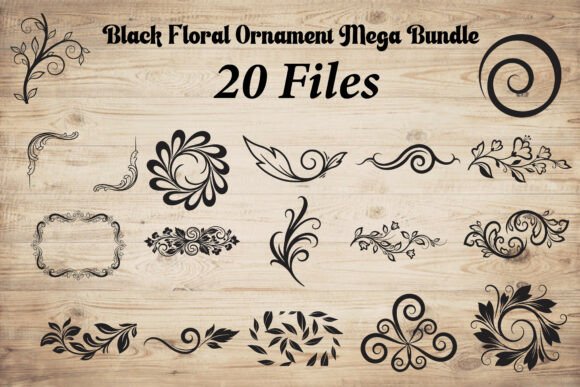
Having access to twenty unique floral designs is exciting, but more is not always better. A frequent design mistake is overcrowding a composition with too many intricate elements. Floral silhouettes are powerful because of their negative space and elegant lines. When you layer too many branches or combine them with busy backgrounds, the visual impact is diluted, and the design can look chaotic rather than sophisticated.
To maintain elegance, practice restraint. Use a single, well-placed branch to frame text on an invitation, or pair two complementary shapes to create balance. Consider the hierarchy of your design; the floral element should enhance the message, not compete with it. Additionally, pay attention to color choices. While silhouettes are traditionally black, experimenting with muted pastels or metallic tones can add depth. However, ensure there is sufficient contrast between the floral element and the background to maintain readability and visual clarity.
Technical Preparation for Best Results
Before you begin any project, take a moment to organize your files. The bundle includes multiple formats, so create a folder structure that separates vectors from raster images. This saves time when you are in the flow of creation and need to quickly locate the right file type. For web designers, the PNG files with transparent backgrounds are ideal for quick implementation, but for print professionals, the PDF or EPS files will yield sharper results.
Also, consider the resolution requirements of your output medium. If you are using the JPGs for a digital ad, ensure they are high-resolution enough to look crisp on retina displays. If you are editing the vector files, save your working copies in a native format (like .AI) to preserve editability, and only export to final formats once the design is approved. This workflow prevents data loss and allows for easy revisions if client feedback requires changes to the floral arrangement.
Making the Right Choice for Your Project
Ultimately, the Floral Branch Silhouette Vector Bundle is a versatile tool that can streamline your creative process if used correctly. By understanding the technical differences between file formats, respecting licensing agreements, and applying thoughtful design principles, you can avoid common pitfalls that hinder quality and efficiency. Whether you are a seasoned designer or a hobbyist exploring new crafts, taking the time to learn these best practices will enhance your results and boost your confidence in using digital botanical assets.
Remember to always preview your designs at actual size before finalizing them, check your machine settings for cutting projects, and keep your files organized. These small habits make a significant difference in the professionalism of your output. With the right approach, these elegant floral silhouettes can become a staple in your creative toolkit, adding natural beauty and sophistication to every project you touch.