Integrating Pink Rose Watercolor Vector Assets into Professional Design Workflows
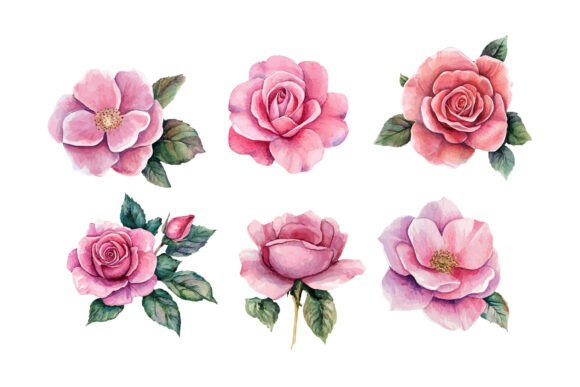
In the landscape of modern graphic design, the intersection of organic artistry and digital precision is where high-quality visual communication thrives. The Pink Rose Watercolor Vector represents a specific solution to a common creative challenge: maintaining the soft, emotive texture of hand-painted florals while ensuring the technical scalability required for professional production. For designers, small business owners, and content creators, understanding how to effectively integrate these assets into existing workflows can significantly enhance efficiency without compromising aesthetic integrity.
This article explores the practical application of watercolor pink rose vectors, moving beyond simple decoration to discuss their role in branding consistency, print preparation, and digital asset management. By treating these elements as functional components of a broader design system, creators can streamline their processes from initial concept to final delivery.
The Technical Advantage of Scalable Floral Assets
Traditional raster images of watercolor paintings often suffer from resolution limitations. When enlarged for large-format printing, such as wedding backdrops or packaging boxes, pixelation becomes inevitable. The primary value proposition of a Pink Rose Watercolor Vector lies in its mathematical construction. Unlike pixels, vector paths define shapes through coordinates, allowing infinite scalability without quality loss.
However, achieving a genuine watercolor look within a vector format requires sophisticated illustration techniques. High-quality collections preserve natural brush details, subtle color gradients, and textured edges that mimic real pigment behavior on paper. This duality—organic appearance with digital robustness—makes these assets versatile. They fit seamlessly into workflows that demand both artistic flair and technical reliability. Whether you are designing a delicate business card or a large vinyl decal, the asset remains crisp, eliminating the need for multiple file versions at different resolutions.
Strategic Placement in the Design Process
Integrating floral vectors should not be an afterthought. To maximize their impact, consider their role at various stages of your project lifecycle.
Pre-Production and Brand Identity
During the branding phase, consistency is paramount. A Watercolor Pink Roses Vector Collection can serve as a foundational element of a visual identity system. Before launching a product line or service, define how these roses will appear across touchpoints. Will they be used as subtle background textures on letterheads? Or as prominent focal points on packaging?
By establishing these guidelines early, you ensure that every subsequent design decision aligns with the brand’s tone. The romantic charm and graceful beauty of hand-painted florals convey specific emotional cues—softness, femininity, and elegance. Aligning these cues with your target audience’s expectations during the planning stage prevents costly revisions later.
Execution and Customization
One of the most significant workflow advantages of vector files is editability. During the execution phase, you may need to adjust colors to match specific Pantone codes or brand palettes. Because each rose and bud is constructed with clean paths, recoloring is instantaneous. This flexibility allows for rapid A/B testing of design variations. You can experiment with monochromatic schemes for a minimalist look or vibrant hues for seasonal campaigns without redrawing any elements.
Furthermore, layer organization is critical. High-quality vector sets typically separate individual flowers, leaves, and buds into distinct layers. This structure enables designers to deconstruct and reassemble compositions quickly. Instead of searching for isolated clipart, you can build custom arrangements that fit unique layout constraints, saving hours of manual illustration time.
Compatibility and Tool Integration
Understanding software compatibility ensures smooth implementation. Most Pink Rose Watercolor Vector files are delivered in SVG, AI, or EPS formats. These standards are widely supported across industry-leading platforms:
- Adobe Illustrator: Ideal for deep editing, path manipulation, and complex color adjustments.
- Affinity Designer: A cost-effective alternative that handles vector nodes and transparency effects efficiently.
- Canva Pro: Supports SVG uploads, allowing non-designers to incorporate professional vectors into drag-and-drop templates.
- Cricut Design Space & Silhouette Studio: Essential for crafters using cutting machines. Vectors ensure clean cut lines for stickers, decals, and heat transfer vinyl.
When working across multiple tools, maintain a master library of your edited vector assets. If you customize a rose’s color in Illustrator for a client logo, save that specific version in a shared cloud folder. This practice ensures that team members or future projects use the approved variant, maintaining brand consistency and reducing redundant work.
Application Across Industries and Mediums
The versatility of watercolor roses extends beyond traditional print media. Here is how different professionals can leverage these assets in their specific contexts:
Wedding and Event Stationery
For stationery designers, the delicate nature of pink roses complements the romantic theme of weddings. Use vectors to create intricate borders for invitations or subtle watermarks on RSVP cards. Since vectors scale perfectly, you can apply the same floral motif to large welcome signs and tiny favor tags, ensuring a cohesive event aesthetic. The ability to adjust opacity allows for layered effects, adding depth without overwhelming textual information.
E-Commerce and Packaging
Small business owners selling handmade goods, cosmetics, or artisanal foods can use these vectors to elevate packaging design. A soft floral pattern on a box or label communicates care and quality. Because vector files are lightweight compared to high-resolution photos, they load faster on e-commerce platforms when used as product mockup overlays. Additionally, for sublimation printing on mugs or textiles, vectors provide sharp edges that translate well onto curved surfaces.
Digital Marketing and Social Media
In digital spaces, attention spans are short. Use floral vectors to frame key messages in Instagram stories or Pinterest pins. The organic shapes break up the rigid grid of social feeds, drawing the eye to promotional content. Since vectors are resolution-independent, they look sharp on high-density retina displays, enhancing perceived professionalism. You can also animate individual petals or leaves using motion graphics software, creating engaging micro-interactions for website headers or email newsletters.
Quality Control and Best Practices
To ensure optimal results, adhere to the following implementation guidelines:
- Check Path Complexity: Highly detailed watercolor simulations can contain thousands of anchor points. If performance slows down in your design software, consider simplifying paths or rasterizing specific decorative elements that do not require scaling.
- Color Profile Management: Always verify whether your project requires CMYK (print) or RGB (digital) color modes. While vectors are flexible, starting with the correct profile prevents unexpected color shifts during export.
- Layer Naming: Rename layers logically upon import. Instead of "Layer 1," use descriptors like "Large Rose," "Bud Cluster," or "Leaf Accent." This habit saves time during collaborative projects or when revisiting old files.
- Licensing Compliance: Respect intellectual property rights. Ensure your license covers commercial use if you are selling products featuring these designs. Keep records of purchase receipts and license terms for legal protection.
Long-Term Asset Management
Treating your Pink Rose Watercolor Vector collection as a long-term resource rather than a one-time purchase maximizes return on investment. Organize your files by style, color palette, and usage rights. Create preview sheets with thumbnail images for quick visual reference. Over time, you will build a robust library of floral elements that can be mixed and matched for diverse projects.
Regularly update your skills in vector editing software to take full advantage of new features. Techniques such as mesh gradients or blend tools can further enhance the watercolor effect, allowing for even more realistic textures. By continuously refining your technical approach, you ensure that your creative output remains competitive and visually compelling.
In conclusion, the integration of Watercolor Pink Roses Vector assets into your workflow offers a blend of artistic elegance and technical efficiency. By understanding their scalability, customization potential, and compatibility with various tools, you can elevate your design projects while streamlining production. Whether you are crafting a wedding invitation suite or branding a new product line, these vectors provide the flexibility needed to achieve professional, polished results consistently.